

TL;DR:
- Crossplay between Java and Bedrock Minecraft editions is achievable through Geyser, which translates protocols in real time to allow Bedrock players to join Java servers seamlessly. The two editions differ significantly in platform support, server software, plugins, and network protocols, requiring proper port forwarding and setup for smooth cross-platform play. Long-term server success relies more on active community management than technical features alone, regardless of the chosen edition.
Half your crew plays on PC, and the other half is on Xbox or a phone. You want one server. The immediate assumption is that it's impossible, that Java and Bedrock just don't mix. That frustration is real, and it's one of the most common sticking points in the java vs bedrock servers debate. But the good news is that the gap between these two editions is far more bridgeable than most players realize, and choosing the right platform comes down to understanding a handful of concrete differences in how each edition works under the hood.
Table of Contents
- Understanding Minecraft Java and Bedrock editions: platforms, protocols, and players
- Crossplay realities: how Geyser enables Bedrock players on Java servers
- Java and Bedrock server differences: plugins, mods, customization, and maintenance
- Choosing the right server for your Minecraft group: access, gameplay, and long-term plans
- Practical server setup tips: ports, protocols, and maximizing crossplay success
- Why the vanilla Java vs Bedrock debate misses the real server success factors
- Start your Minecraft journey with Gaia Legends: expert guides and community support
- Frequently asked questions
Key Takeaways
| Point | Details |
|---|---|
| Distinct editions | Java and Bedrock editions run on different platforms and use incompatible networking protocols by default. |
| Geyser bridge | Geyser enables Bedrock players to join Java servers by translating network protocols in real time. |
| Customization tradeoffs | Java servers support extensive plugins and mods but require more maintenance; Bedrock servers offer easier access but limited extensibility. |
| Port forwarding | Properly forwarding UDP 19132 for Bedrock and TCP 25565 for Java is crucial for smooth server connectivity. |
| Choose by audience | Pick Java for PC-centric and modded communities; Bedrock for cross-device ease; Java + Geyser for a hybrid approach. |
Understanding Minecraft Java and Bedrock editions: platforms, protocols, and players
Before you can make a smart server choice, you need to understand why these two editions exist as separate products at all. This isn't just a branding decision by Mojang. It's a deep technical split.
Java Edition runs on PC, Mac, and Linux while Bedrock Edition is built in C++ and runs on consoles, mobile, and Windows 10/11. That difference in programming language matters more than it sounds. Java runs on a virtual machine, which is great for modding and plugin hooks. C++ compiles closer to the hardware, which is why Bedrock tends to perform better on lower-end devices like phones and tablets.
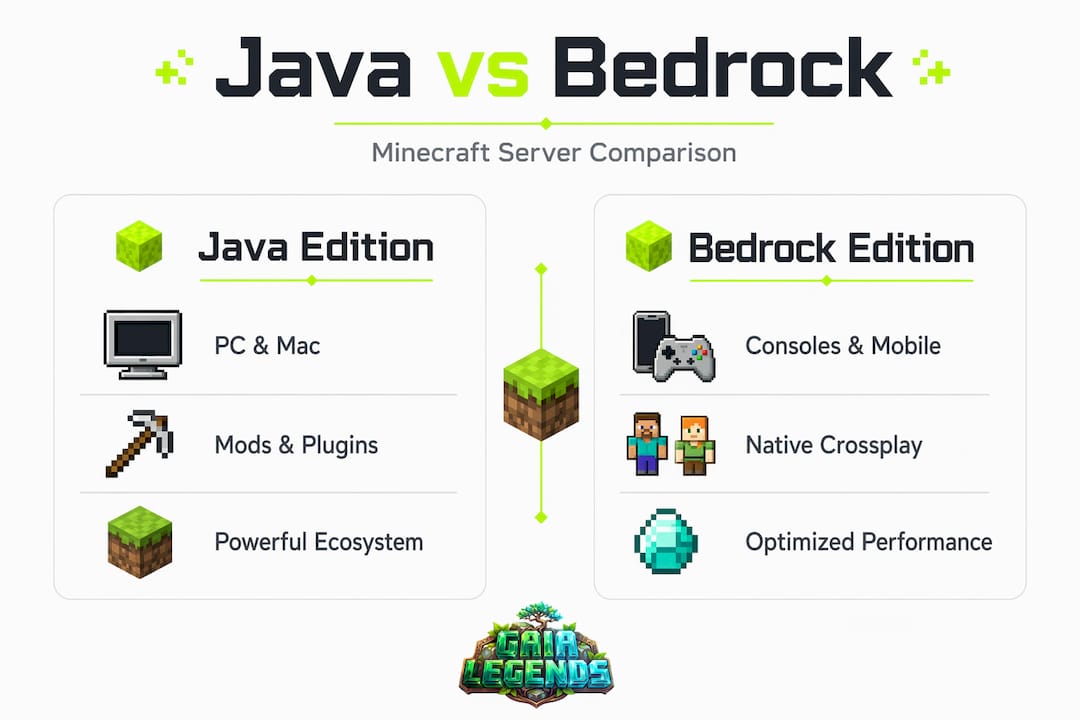
The network protocols are where server hosting gets interesting. Bedrock uses UDP on port 19132 versus Java's TCP port 25565. UDP is a faster, connectionless protocol, which is why Bedrock feels snappier on mobile networks. TCP is more reliable and ordered, which suits Java's complex plugin ecosystems. When you set up a server, getting these ports right is non-negotiable.
Here's a quick breakdown of the platform differences you should know:
- Java Edition runs exclusively on PC, Mac, and Linux. Your player base is desktop-only.
- Bedrock Edition runs on Windows 10/11, Xbox, PlayStation, Nintendo Switch, iOS, and Android.
- Java player base skews toward experienced PC gamers who want mods, custom rules, and plugin-driven gameplay.
- Bedrock player base is broader, younger, and spans casual mobile players to console enthusiasts.
- Bedrock is engineered for cross-device play by default. Java is not.
- Server software differs completely. Java servers run on software like Vanilla, Paper, or Spigot. Bedrock uses Bedrock Dedicated Server (BDS).
Understanding the Minecraft editions overview helps you frame every other decision in this guide. With these fundamental distinctions clear, let's explore how crossplay works and the solutions for bridging these versions.
Crossplay realities: how Geyser enables Bedrock players on Java servers
This is where things get genuinely exciting. The minecraft java vs bedrock crossplay problem has a real, widely used solution called Geyser. It's a proxy tool that sits between a Bedrock client and a Java server, translating packets in real time so the Java server thinks it's talking to another Java client.
Geyser converts Bedrock protocol packets into Java packets on the fly, which is technically impressive and practically useful. You run it either as a plugin on your Java server or as a standalone proxy. Either way, Bedrock players connect to a separate UDP address, and Geyser handles the handshake. The Java server never knows the difference.
Here's the step-by-step flow of how a Bedrock player joins a Java server via Geyser:
- Bedrock client sends a connection request via UDP to your Geyser listener port (usually 19132).
- Geyser intercepts and translates the packets from Bedrock protocol into Java Edition's TCP protocol format.
- Geyser forwards the translated packets to the Java server's TCP port 25565 as if they came from a Java client.
- Floodgate authenticates the Bedrock player without requiring them to own a Java Edition account.
- The Bedrock player loads into the Java world with some visual and UI differences but full gameplay access.
Bedrock clients connect via UDP on a separate port that must be forwarded in addition to the Java server's TCP port. Forgetting this step is the number one setup mistake we see on community servers. Both ports must be open and forwarded correctly, or Bedrock players simply cannot connect.
Worth knowing: Geyser is a bridge, not a native integration. Some UI elements, inventory layouts, and controls will feel slightly different for Bedrock players compared to Java. Particle effects, some rendering quirks, and control mappings may vary. This is a trade-off worth accepting for most community servers.
Pro Tip: Add Floodgate alongside Geyser so Bedrock players don't need a Java account to join. Without Floodgate, you'd need to run your server in offline mode, which removes authentication for all players. Floodgate keeps Java players authenticated while giving Bedrock players a smooth login.
For practical crossplay server setup tips, check our full community server guide. Now that we understand how players can crossplay, let's compare server features and administrative differences between Java and Bedrock.
Java and Bedrock server differences: plugins, mods, customization, and maintenance
This is where the java vs bedrock comparison gets most relevant for server admins. It's not just about who can connect. It's about what your server can actually do.
Java servers run a rich plugin and mod ecosystem, often powered by Paper for better performance and more capable APIs. Paper alone gives you async chunk loading, better TPS stability, and access to thousands of plugins from economy systems to minigame frameworks. If you want a prison server, a factions server, or a custom RPG experience, Java is where that all lives. Bedrock servers rely on Addons and Marketplace content instead of traditional plugins, which limits what you can build but also significantly reduces setup complexity.

Here's a side-by-side look at the key differences:
| Feature | Java Edition servers | Bedrock Edition servers |
|---|---|---|
| Plugin support | Full (Spigot, Paper, Bukkit) | None (Addons only) |
| Mod support | Extensive (Fabric, Forge) | Very limited |
| Performance tuning | High (via Paper/Purpur) | Moderate |
| Setup difficulty | Medium to high | Low |
| Maintenance effort | High (plugin updates, conflicts) | Low |
| Customization depth | Very deep | Shallow to moderate |
| Cross-device support | Requires Geyser | Native |
| Server software | Paper, Spigot, Vanilla | Bedrock Dedicated Server |
The maintenance gap is real. Running a Java server means managing plugin versions across every Minecraft update. A major update like 1.21 can break a dozen plugins overnight, and you're left patching or waiting for plugin authors to catch up. Bedrock server admins don't deal with that headache anywhere near as often.
Key considerations for each platform:
- Java servers need regular plugin audits, dependency checks, and compatibility testing after every major update.
- Bedrock servers update more smoothly but give you far less control over gameplay rules and mechanics.
- Paper server software adds significant performance headroom, especially for servers with 50+ players.
- Addons on Bedrock can add behavior packs and resource packs but cannot match the depth of Java plugins.
Pro Tip: If you're running a Java server with a lot of plugins, use a staging environment. Spin up a test server on the same hardware, apply updates there first, and only push changes to your main server after everything checks out. This one habit saved us from multiple catastrophic downtimes on our 200-player SMP.
For more on plugin and mod hosting options, we've got a dedicated guide that walks through the best setups. Understanding these feature tradeoffs helps when deciding which server platform best fits your player group and goals.
Choosing the right server for your Minecraft group: access, gameplay, and long-term plans
Let's get practical. The best server for Minecraft isn't a universal answer. It depends on who's playing, what devices they're using, and how much time you're willing to put into admin work.
Bedrock offers the easiest joining experience across consoles, phones, and tablets by default. If your friend group includes people on Xbox, Switch, and Android, and nobody wants to deal with setup headaches, a Bedrock server is your fastest path to getting everyone online together. Java with Geyser is ideal if you want Java-level customization alongside Bedrock compatibility, but you'll pay for it in higher maintenance costs and occasional quirks.
Ask yourself these questions before committing to a platform:
- Who is in your player group? Console and mobile players lean Bedrock. PC-only groups can go pure Java.
- What gameplay features do you want? Custom plugins, economy systems, and modpacks all require Java.
- How much admin time do you have? Bedrock is far lower maintenance. Java rewards the dedicated server admin.
- Do you have a long-term build project in mind? Java's mod and plugin ecosystem gives you more tools to grow over time.
- Is crossplay a hard requirement? Java+Geyser handles it, but add a few extra hours of setup and monitoring to your plan.
If you decide to go the Java+Geyser route, here's a realistic setup sequence to follow:
- Choose a Java server host with enough RAM (4GB minimum for a small group, 8GB+ for 20+ players).
- Install Paper as your server software for the best plugin performance.
- Install the Geyser plugin and configure your Bedrock listening port (default 19132, UDP).
- Install Floodgate to handle Bedrock player authentication.
- Forward both TCP 25565 (Java) and UDP 19132 (Bedrock) on your router or firewall.
- Test connections from a Java client and a Bedrock client before inviting your group.
- Invite players, monitor TPS, and adjust RAM allocation based on load.
Start finding your ideal SMP server style first, then build your tech setup around those goals. Version control and mod compatibility consistently favor Java for long-term creative projects, but only if you have someone willing to keep up with updates. Your SMP server choice guide can help clarify what server format fits your goals. With this decision framework, let's dive into some practical server setup tips to help you get started.
Practical server setup tips: ports, protocols, and maximizing crossplay success
Getting your server running is one thing. Getting it running correctly for both Java and Bedrock players is another. Most crossplay failures come down to network configuration mistakes, not the server software itself.
Bedrock uses UDP on port 19132, which frequently trips up home router setups that default to TCP forwarding. This is genuinely the most common failure point we've seen when helping players get their first crossplay server running. You open port 19132, test it, and Bedrock players still can't connect because the router forwarded TCP instead of UDP.
Geyser requires a dedicated UDP port for Bedrock clients in addition to the Java server's TCP port, which adds a layer of complexity to port management. If you're on a shared host, confirm they support UDP port forwarding before you commit to a plan.
Here are the setup essentials to get right from day one:
- Forward TCP 25565 for your Java server. This is the standard and most hosts handle it automatically.
- Forward UDP 19132 for Bedrock or Geyser. Double-check the protocol type in your router's port forwarding UI.
- Test from multiple platforms early, before you invite your community. A quick connection test from a phone or console saves hours of troubleshooting later.
- Use Docker for Bedrock server deployment on home hardware. It isolates the server environment and makes restarting or updating the server clean and simple.
- Back up your server configs weekly. Plugin config files, world data, and permission settings should all be version-controlled if possible.
- Keep plugin versions consistent. Running a plugin from 2023 on a 1.21 Paper build is asking for TPS issues and unexpected crashes.
A note on NAT issues: If you're hosting at home behind a double NAT (common with ISP-provided modem-router combos), Bedrock connections are especially prone to failure. Put your router in DMZ mode or configure NAT loopback to avoid players being able to join from outside your network but not from inside it.
Pro Tip: Use a free port checker tool online to verify that both your TCP and UDP ports are actually open and reachable from the outside world. Many players forward ports correctly in their router but forget that their operating system firewall (Windows Defender, iptables on Linux) is still blocking the traffic.
Check out our server setup basics guide for a full walkthrough, and our server admin best practices article for keeping your server healthy long-term. Having set your server up correctly, consider this expert perspective on how to think about these platforms beyond features and performance.
Why the vanilla Java vs Bedrock debate misses the real server success factors
We've been running a 200-player SMP server for long enough to say this plainly: the edition debate is mostly a distraction from the actual work of running a good server.
Players get absorbed in the java server advantages checklist or the bedrock server features breakdown, and they lose sight of what actually determines whether a server thrives. It's not the plugin count. It's not the TPS ceiling. It's whether people want to keep logging in.
Java's massive ecosystem is genuinely powerful. But that power comes with a real cost. Every update cycle brings plugin conflicts, broken features, and admin hours spent chasing compatibility. We've seen servers collapse not because they chose the wrong edition, but because the admin team burned out maintaining it. Bedrock is more forgiving in that regard, and for smaller friend groups or younger communities, that lower friction genuinely matters.
Geyser is a remarkable piece of software. It works well the vast majority of the time. But it is still a bridge, and bridges have gaps. Bedrock players occasionally experience inventory quirks, UI differences, and missing mod content that Java players take for granted. If your server identity is built around a specific modpack experience, that gap becomes meaningful.
The servers we've seen succeed long-term share one trait that has nothing to do with edition: active community management. Events, player recognition, fair rules enforcement, and consistent updates keep people coming back. A Bedrock server with engaged admins will outlast a Java server with 200 plugins and no one steering the community.
So yes, work through the technical comparison. Make the right choice for your devices and your goals. But then put equal energy into building community around your server. That's what actually decides whether your server is still running a year from now.
Start your Minecraft journey with Gaia Legends: expert guides and community support
At Gaia Legends, we built our guides platform on the back of real server admin experience, including everything we've learned managing a 200-player SMP through multiple major Minecraft updates.
Whether you're trying to set up your first crossplay server, find the best plugin stack for a Java SMP, or just figure out which edition your group should be on, Gaia Legends guides has you covered with practical, tested advice. We publish five guides a day across server setup, survival strategies, build design, and community management. Explore our guide on building thriving Minecraft communities to turn your server from a place people visit into a place they call home. And if you're still deciding on a server format, our resource on finding the best SMP server will help you land on the right fit for your crew. With these trusted resources, you're equipped to choose and run the perfect Minecraft server for your players.
Frequently asked questions
Can Java and Bedrock players join the same Minecraft server?
Not natively, but using Geyser as a proxy lets Bedrock players join Java servers by translating protocols in real time, so you don't need to run two separate servers.
Which server is easier to set up for cross-platform multiplayer?
Bedrock servers are generally the easier option because they're designed for cross-platform play natively, with less plugin maintenance and simpler network configuration compared to running a Java+Geyser bridge.
What are the key port requirements when hosting Java and Bedrock servers?
Java servers use TCP port 25565 while Bedrock servers require UDP port 19132, and both must be correctly forwarded on your router or firewall for players to connect successfully.
Can mods that require client installation work on Bedrock players joining Java servers via Geyser?
No. Bedrock players connecting through Geyser cannot use client-required mods because they don't have the mod files installed, which means modpack-centric Java servers offer a fundamentally different experience for Bedrock visitors.
What are common mistakes when hosting a Bedrock server at home?
The most frequent mistake is forwarding TCP instead of UDP for port 19132, since many routers default to TCP in their port-forward interface and players often don't catch the error until Bedrock clients fail to connect.