

TL;DR:
- Optimizing hardware alone does not guarantee faster progress or enhanced gameplay in Minecraft; understanding game mechanics and strategic planning are more impactful.
- Effective survival depends on purposeful actions during early-game, efficient base organization, and mastering resource gathering and combat techniques.
Lagging out mid-fight, dying on the first night, or spending thirty minutes just organizing chests are experiences every Minecraft player knows too well. Whether you're running a survival world solo or jumping into a multiplayer SMP, unoptimized gameplay drains the fun fast. This guide walks you through practical, tested strategies covering technical performance, survival efficiency, base design, resource gathering, and combat. No fluff, no vague advice. Just clear steps that actually make your sessions smoother, smarter, and a lot more rewarding.
Table of Contents
- Essential tools and settings for optimal performance
- Fine-tune game and system settings
- Smart survival: start stronger and last longer
- Base building and organization for speed and security
- Advanced resource acquisition and combat tactics
- The truth about Minecraft optimization: what really moves the needle
- Level up your play with more expert Minecraft guides
- Frequently asked questions
Key Takeaways
| Point | Details |
|---|---|
| Optimize RAM | Allocate 4-8GB RAM to Minecraft but never more than half your system’s total memory. |
| Update software | Keep Java and graphics drivers current for up to 30 percent higher FPS. |
| Start smart in survival | Gather logs, craft stone tools, and build a shelter before night for the strongest early start. |
| Centralize and defend your base | Keep essential stations close and your base well-lit and fortified for safe, efficient play. |
| Master mining and combat | Use correct Y-levels, efficient mining methods, and optimized combat timing for the best resources and safety. |
Essential tools and settings for optimal performance
With your optimization goals in mind, start by setting up your game environment for peak performance. Before you even think about crafting a pickaxe, your game client needs to be running at its best. Poor FPS (frames per second) can ruin reaction time in combat and make even basic exploration feel sluggish.
RAM allocation: the sweet spot matters
Most players either under-allocate RAM and get stutters, or over-allocate and trigger constant garbage collection pauses. The target range is 4 to 8GB, and you should never exceed 50% of your total system RAM. If your PC has 16GB, cap Minecraft at 8GB. If you have 8GB total, stick to 3 to 4GB. Pushing beyond that threshold means your system runs out of memory for background processes, which actually makes things worse.
Allocating more RAM than your system can spare causes the Java garbage collector to work overtime, creating those notorious "lag spikes" even on high-end machines.
Java and graphics drivers: easy wins
One of the fastest improving FPS wins you can get costs nothing. Updating Java and your graphics drivers can boost your FPS by 10 to 30 percent instantly. For Minecraft 1.17 and later, you need Java 17 or 21. Many players are still running outdated Java versions without realizing it. Check your Java version in the launcher settings and update if needed. Similarly, GPU driver updates from NVIDIA, AMD, or Intel often include game-specific optimizations.
Mod selection: Sodium vs. OptiFine
This debate comes up constantly in the community. The Sodium/Fabric combo consistently outperforms OptiFine for modern Minecraft in raw FPS terms, while OptiFine remains the easier choice if you want shaders or the zoom feature. Here's a quick breakdown to help you decide:
| Feature | Sodium + Fabric | OptiFine |
|---|---|---|
| FPS improvement | Very high | Moderate |
| Shader support | Requires Iris mod | Built-in |
| Zoom feature | Requires extra mod | Built-in |
| Ease of setup | Moderate | Simple |
| Best for | Performance-focused players | Visual customization |
If you want the fastest possible frame rate on a lower-end machine, go with performance mods like Sodium, Lithium, and Starlight. If you love beautiful shaders and don't want to juggle multiple mods, OptiFine still works fine.
Recommended starter video settings
These settings offer the best balance of visuals and performance for most players:
- Render distance: 8 to 10 chunks (drop to 6 on lower-end PCs)
- Simulation distance: 6 chunks (affects mob behavior and chunk updates)
- VSync: Off (use a frame cap instead to reduce input lag)
- Max framerate: Cap at 120 FPS or twice your monitor's refresh rate
- Clouds: Fast or Off
- Particles: Minimal
- Entity shadows: Off on lower-end hardware
Pro Tip: Turning off VSync and setting a manual frame cap reduces input latency significantly, which makes combat feel more responsive. This is especially important in PvP situations where every millisecond counts.
Fine-tune game and system settings
Now that you have the right tools, let's fine-tune your in-game and system settings for the smoothest play possible. Even with great mods, poor configuration can hold you back.
Aikar's JVM flags for Java Edition
JVM flags are arguments you add to the Java launch command that control how memory and garbage collection behave. Aikar's flags are widely recommended in the Minecraft community for reducing lag spikes. These flags optimize how Java manages memory cleanup so it doesn't pause your game for cleanup cycles. You can add them directly in the launcher's JVM arguments box.

The key benefit is smoother, more consistent performance rather than bursts of high FPS followed by sudden drops. When combined with proper Java performance improvements, these flags make a measurable difference on both singleplayer and server environments.
Allocating RAM correctly: revisiting the rule
It bears repeating because it's so commonly misunderstood. Allocate 4 to 8GB of RAM, and use Aikar's JVM flags for garbage collection optimization. More RAM does not always mean better performance. Over-allocating forces Java to manage a huge memory heap, which increases garbage collection time and creates noticeable pauses.
Here's a quick comparison between Java and Bedrock Edition for performance considerations:
| Aspect | Java Edition | Bedrock Edition |
|---|---|---|
| Mod support | Extensive | Limited |
| FPS optimization | Highly customizable | Less flexible |
| Performance on low-end PCs | Requires tuning | Generally smoother by default |
| Multiplayer options | SMP, custom servers | Realms, limited servers |
| Combat mechanics | Advanced (cooldown system) | Simpler |
System-level tweaks that actually help
Your PC settings matter just as much as your in-game settings. Here's a quick priority list:
- Set your Windows power plan to High Performance (or Balanced if on a laptop to prevent overheating).
- Close background apps like browsers, Discord video, and streaming software when playing.
- Set Minecraft's process priority to Above Normal in Task Manager during gameplay.
- Make sure your PC is ventilated properly. Thermal throttling kills FPS more than almost anything else.
- Update your graphics drivers through the official NVIDIA, AMD, or Intel panel, not Windows Update.
For server owners, the view-distance setting should be set to 6 to 8 and simulation-distance to 4 to 6, paired with Aikar's JVM flags for the best server-side performance. A lower simulation distance reduces the server's processing load dramatically without much visual impact for players.
Pro Tip: If you're hosting a local LAN server for friends, lowering the simulation distance to 4 is often the single biggest TPS (ticks per second) improvement you can make without changing anything else.
Smart survival: start stronger and last longer
With your technical setup optimized, you can focus on smarter survival, making every in-game day count. The first few in-game days determine how your entire world goes. Most new players burn daylight doing things out of order, then scramble when night hits.
The optimal early-game action sequence
Following a deliberate order of actions makes the difference between a strong start and spawning back at the world origin. Based on proven survival strategies, here is the recommended sequence for Day 1:
- Punch 16 or more logs immediately. Oak, birch, or spruce all work. You need enough to build your crafting table, tools, and shelter.
- Craft a crafting table and wooden pickaxe first. Don't skip straight to building yet.
- Mine 12 to 20 stone blocks to craft stone tools right away. Stone tools are roughly twice as fast and significantly more durable than wood tools.
- Gather food. Kill animals you encounter while gathering materials. Cooked food gives more hunger restoration.
- Find or dig a shelter location before dusk. You want walls and a roof before the sky turns orange.
- Place torches inside your shelter. Mobs can't spawn where light level is 8 or above, which is critical for your first night.
The biggest mistake new players make is exploring during the first day and leaving shelter-building too late. Your goal on Day 1 is survival, not discovery.
Use the night productively
First-night survival is about prioritizing shelter and torches over exploration. But once you're safe inside, don't just wait it out. Use those night cycles to:
- Craft your full set of stone tools
- Smelt any raw food or ore you collected during the day
- Organize your inventory and plan your next day's tasks
- Craft chests to start an early storage system
The players who progress fastest treat nighttime as their crafting and planning phase. It's free processing time while daylight is reserved for active gathering. These survival tips and top Minecraft tricks go deeper if you want the full early-game picture.
Torch placement strategy
Torches aren't just for lighting your house. Strategic placement prevents mob spawning across your surrounding area, making outdoor movement much safer. Place torches every 9 to 12 blocks outdoors and mark your path when caving so you can always find your way back. A torch on the left wall going in means you follow the right wall coming out. Simple, effective, and it works every time.
Base building and organization for speed and security
Securing a strong survival foundation, the next level is optimizing your base for speed and safety. A poorly laid-out base wastes more time than most players realize. Walking 30 blocks to grab arrows every time you need them adds up to minutes, then hours, over a long session.
Centralize everything within 10 to 15 blocks
Base optimization best practices consistently point to centralizing crafting and storage, keeping short paths between zones, lighting up the entire perimeter, and building a defensible perimeter with 3-block walls, overhangs, and trenches. Your crafting table, furnaces, chests, and bed should all sit within 10 to 15 blocks of your central working spot. This sounds simple, but most players spread things out as they expand and never reorganize.
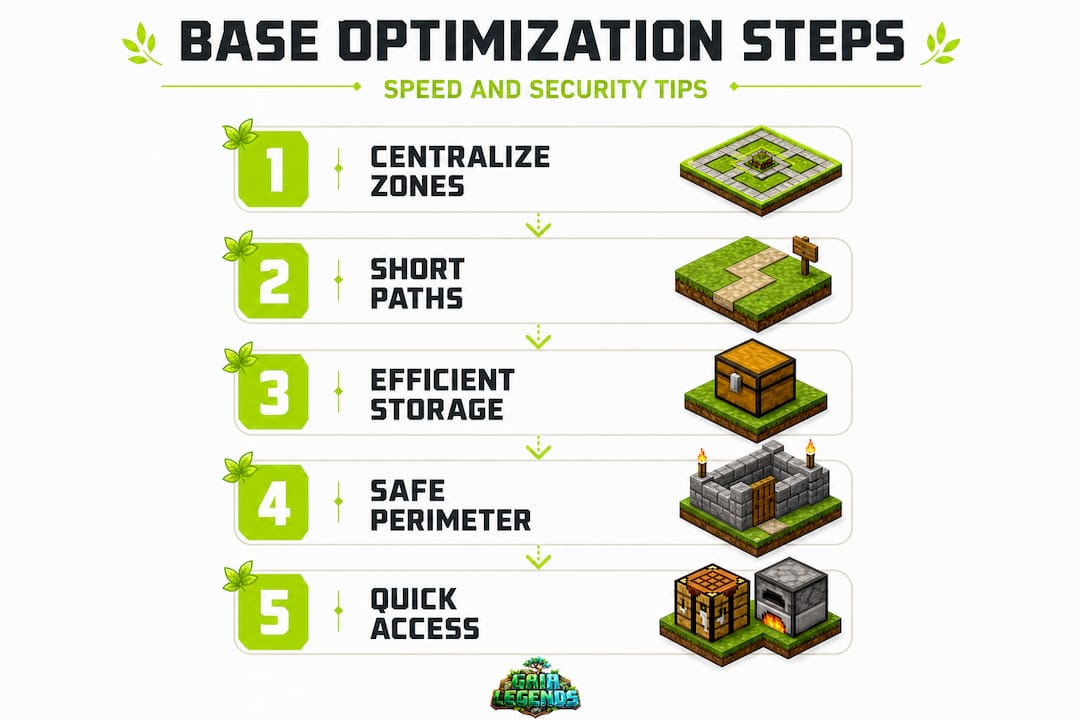
| Base zone | Purpose | Recommended distance from center |
|---|---|---|
| Crafting station | Crafting table + workbench | 0 to 5 blocks |
| Storage room | Chest organization by category | 5 to 10 blocks |
| Smelting area | Furnaces, blast furnaces, smokers | 5 to 10 blocks |
| Farm zone | Food production | 10 to 20 blocks |
| Defensive perimeter | Walls, moat, entrance | Outer edge |
Defense and perimeter setup
Building a base that actually keeps mobs out requires more than just a door. Here are the most effective defensive design choices:
- 3-block tall walls prevent most mob pathfinding from reaching your entrance
- Overhangs (slabs or blocks jutting outward) stop spiders from scaling your walls
- Trenches or moats around the outer perimeter slow down or trap hostile mobs
- Defensible entrance with an airlock-style double-door so you're never directly exposed when entering
- Full perimeter lighting both inside and outside your walls to prevent spawns entirely
Pro Tip: Carpet on top of your walls counts as a half-block, but spiders treat it as a wall extension. Line the tops of your perimeter walls with carpet and you completely eliminate spider climbing at very low material cost.
For deeper strategies on storage systems and room layouts, check out these base organization tips and survival mode essentials guides.
Advanced resource acquisition and combat tactics
Once your base is secure, it's time to boost your resources and master combat for full gameplay optimization. Knowing where to mine and how to fight efficiently separates casual players from those who truly thrive.
Diamond mining: branch mining at Y = -58
Since the Caves and Cliffs update, diamond generation was completely overhauled. Branch mining at Y = -58 with tunnels spaced 2 blocks apart gives you the highest possible diamond exposure rate. Here's the step-by-step method:
- Dig a main access shaft straight down to Y = -58 (press F3 to check your coordinates).
- Create a central corridor running east to west or north to south.
- Dig branch tunnels off the main corridor, spacing them exactly 2 blocks apart.
- Each branch should run 20 to 30 blocks long before you start a new one.
- Use a Fortune III pickaxe on any diamonds you find to multiply your yield.
Branch mining is far more consistent than strip mining. Strip mining exposes fewer blocks per unit of time and burns through your tools faster. The comparison below shows why branch mining wins:
| Mining method | Blocks exposed per tunnel | Efficiency | Best use case |
|---|---|---|---|
| Branch mining (2-block spacing) | High | Excellent | Diamond and iron hunting |
| Strip mining | Moderate | Moderate | Clearing large flat areas |
| Cave exploration | Variable | High if lucky | Early game, emeralds |
Combat mechanics you need to know
Java Edition combat uses an attack cooldown system, meaning swinging as fast as possible actually hurts your damage output. You need to wait for the attack indicator (the sword icon) to fully charge before striking. Timing your attacks with a full cooldown and using shield blocking for defense is the optimal combat approach. For PvP specifically, 8 to 14 CPS (clicks per second) is considered optimal.
Spam-clicking in Java Edition doesn't deal full damage. One well-timed hit beats three rushed ones. This single mechanic knowledge changes how you approach every fight.
Shield usage is equally important. Raise your shield with right-click to block incoming arrow fire and melee hits. Combine this with strafing movement to make yourself a harder target. These guide book tips include more advanced PvP and boss combat breakdowns worth reading.
Resource farms: the long-term multiplier
Once your base is established, basic farms multiply your resources passively. A simple wheat or carrot farm near your base eliminates the need to hunt for food entirely. A mob farm (even a basic open-platform design) generates XP, arrows, gunpowder, and string on autopilot. You don't need complex redstone for a starter farm. A dark room 24 to 32 blocks above ground where mobs spawn and fall to their deaths is enough to get started.
The truth about Minecraft optimization: what really moves the needle
Stepping back, let's question what optimization really means in the context of Minecraft. After running a 200-player SMP server and watching thousands of players progress through the same early-game stages, one pattern stands out clearly: the players who optimize their hardware the most are not always the ones who progress the fastest or have the most fun.
Here is the uncomfortable truth. Chasing the highest FPS or installing every performance mod is a form of procrastination. You can have a buttery smooth 240 FPS and still die on night one because you didn't prioritize shelter. Hardware optimization is the floor, not the ceiling. It removes friction, but it doesn't create skill.
What genuinely moves the needle is mechanics knowledge over grinding. Understanding Y-levels for diamond spawning, mob AI pathfinding, the attack cooldown system in Java Edition, and light level mechanics gives you leverage that no GPU upgrade can match. A player who knows to mine at Y = -58 will find more diamonds in one hour than a player with a better computer who digs randomly for three hours.
The overlooked optimizations are behavioral, not technical. Planning your path before a caving run. Organizing your inventory before entering a dungeon. Treating in-game night as a crafting session rather than dead time. Setting up a simple wheat farm before you need food instead of after you're already low on hunger. These survival optimization lessons are the habits that separate efficient players from frustrated ones.
We also see players confuse "smooth gameplay" with "efficient progression." Getting 120 FPS feels great. But if you're still aimlessly digging without a plan, you're just failing faster. True optimization means your every session has direction: a mining run with a target depth, a base improvement with a clear layout goal, a combat encounter where you remember to use your shield.
The best investment you can make isn't more RAM or a newer GPU. It's ten minutes reading about game mechanics before your next session. That knowledge compounds every time you play.
Level up your play with more expert Minecraft guides
If you want to keep progressing and mastering your Minecraft sessions, here's where to go next. Gaia Legends is built specifically for players who want to stop guessing and start playing smarter.

At Gaia Legends, we publish five in-depth guides every day covering survival strategies, combat mechanics, build design, item progression, and server recommendations. All of it is grounded in real SMP server experience and verified against official Mojang changelogs. If you're just getting started, the beginner Minecraft guide is a great place to build your foundation before diving into advanced tactics. Every guide is written to give you something actionable, not just something to read.
Frequently asked questions
How much RAM should I allocate to Minecraft for best performance?
Allocate 4 to 8GB of RAM, but never more than 50% of your total system RAM, to prevent garbage collection lag spikes from slowing your game.
What are the fastest tools for early survival in Minecraft?
Switch to stone tools immediately after crafting your first wooden pickaxe. Stone tools are roughly twice as fast and far more durable than their wood counterparts.
Does updating Java or graphics drivers affect Minecraft performance?
Yes, updating Java and drivers can boost your FPS by 10 to 30 percent, making it one of the easiest performance wins available at no cost.
What's the best strategy for finding diamonds?
Branch mine at Y = -58 using tunnels spaced 2 blocks apart. This method exposes the highest concentration of diamond ore blocks per tunnel since the Caves and Cliffs update reworked ore distribution.
Should I use OptiFine or Sodium for Minecraft performance?
The Sodium and Fabric combo delivers better raw FPS for modern Minecraft, while OptiFine remains the simpler option if you primarily want shader support or a built-in zoom function.