

Most players think Minecraft is about placing blocks and surviving the night. That’s true, but it’s only half the picture. Beneath the surface sits a powerful system that lets you reshape entire worlds, automate complex events, and run a 200-player server without breaking a sweat. Commands are the real engine behind custom maps, mini-games, and server administration. They’re not cheats. They’re tools. This guide breaks down exactly what commands do, how target selectors work, why they transform gameplay, and what expert-level strategies separate good command users from genuinely great ones.
Table of Contents
Key Takeaways
| Point | Details |
|---|---|
| Commands empower customization | Minecraft commands let you automate tasks, customize gameplay, and create complex mechanics beyond standard options. |
| Selectors add precision | Target selectors allow advanced users to direct commands at exactly the right players or entities. |
| Efficiency prevents lag | Using scoreboards, scoped selectors, and .mcfunction files keeps gameplay smooth even on busy servers. |
| Testing ensures reliability | Always test and tweak commands in a safe environment to avoid breaking worlds or creating lag. |
What are commands in Minecraft?
Now that we’ve established their significance, let’s start with understanding what Minecraft commands truly are.
Commands are text-based instructions prefixed with ‘/’ that let players and server operators manipulate gameplay elements, execute actions, and automate mechanics. You type them directly into the chat window or run them through command blocks placed in the world. Simple as that. But the depth behind that simplicity is enormous.
You can use commands in two main environments:
-
Single-player worlds with cheats enabled at world creation
-
Multiplayer servers where operators assign permission levels (0 through 4) to control who can run what
Permission levels matter a lot. A level 1 operator can bypass spawn protection, while a level 4 operator has full access to every command available. On a busy server, getting these levels wrong can mean players accidentally wiping builds or banning each other. We’ve seen it happen on our own SMP server more times than we’d like to admit.
Commands fall into a few broad categories:
-
Administration: Kicking, banning, whitelisting, and setting game rules
-
Gameplay: Changing game modes, giving items, applying effects
-
World editing: Filling areas, cloning structures, setting blocks
-
Automation: Running logic through command blocks and functions
Understanding command basics before jumping into advanced setups saves you hours of frustration. One of the biggest misconceptions we hear is that commands are just for cheating in survival mode. They’re not. Professional map makers, server admins, and content creators rely on commands to build experiences that vanilla tools simply cannot produce. Even redstone automation gets supercharged when you pair it with command logic.
Commands are not a shortcut around the game. They are the game’s most powerful creative layer, and knowing them well puts you in a completely different tier of player.
Core mechanics: Target selectors and arguments
With a command foundation in place, let’s look at how commands precisely target players and entities using selectors and arguments.
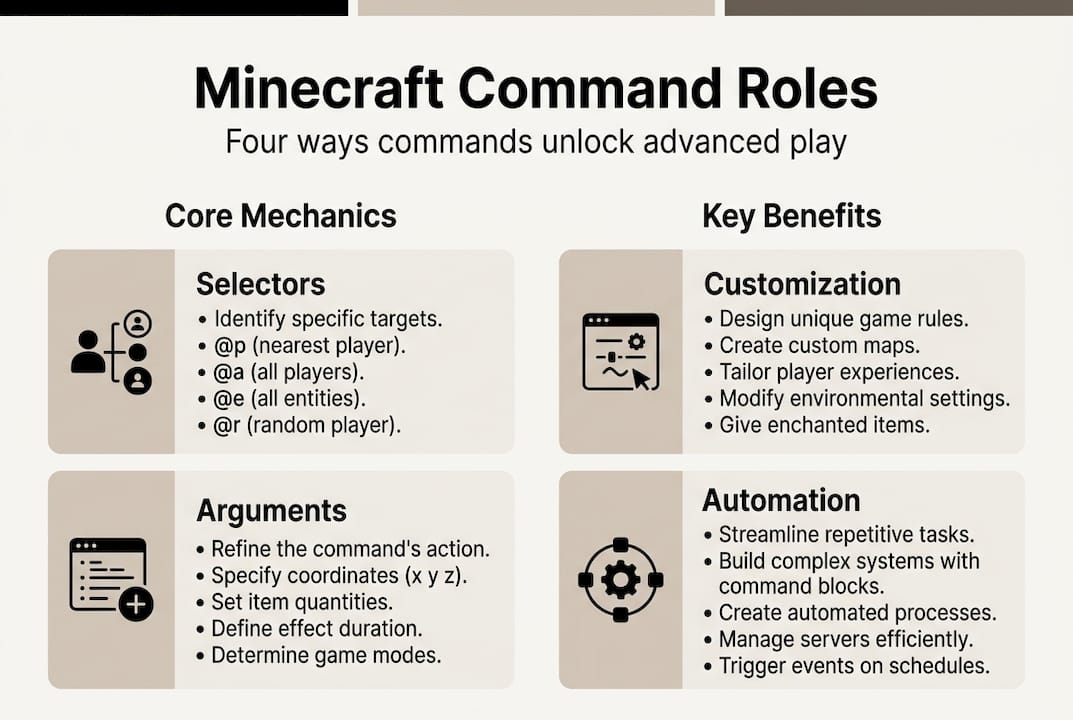
Target selectors like @p, @a, @e, @s, and @r are the core of precise command targeting. Each one tells the game who or what the command should affect.
| Selector | Meaning | Common use |
|---|---|---|
| @p | Nearest player | Teleporting one player |
| @a | All players | Giving everyone an item |
| @e | All entities | Applying effects to mobs |
| @s | Executing entity | Self-targeting in functions |
| @r | Random player | Random event triggers |
Arguments refine these selectors further. For example, "@e[type=zombie,distance=…10]` targets only zombies within 10 blocks of the command source. You can filter by scores, tags, teams, game mode, and more. This level of precision is what separates a clean command setup from a chaotic one.
Java vs. Bedrock selector syntax differs in a few key ways. Java Edition uses distance=..10 while Bedrock uses r=10 for radius. Java supports scores arguments natively, while Bedrock has some limitations. Always check which version you’re building for before writing complex selectors.
Real-world selector use cases include:
-
Teleporting the nearest player to a spawn point during a mini-game reset
-
Applying a Strength effect to all players at the start of a PvP round
-
Removing all dropped items from the world to reduce lag
-
Targeting only players on a specific team for a custom event
For players building trading hall command strategies, precise selectors mean the difference between a smooth automated system and one that accidentally affects every entity on the server.
Pro Tip: Always add distance or tag arguments to @e selectors. Running @e without limits on a large server scans every loaded entity, which can spike your TPS and cause noticeable lag for all players.
How commands transform gameplay
Understanding selectors unlocks the next level: seeing how commands actually power up your gameplay.
Commands enhance servers through four core pillars: administration, gameplay customization, world editing, and automation. Each one opens a different door.
Administration keeps your world safe. Commands like /ban, /whitelist add, and /op give server owners control over who plays and how. Without them, managing even a small server becomes a full-time headache.
Customization lets you bend the rules. Want a world where it never rains? /gamerule doWeatherCycle false. Want players to keep their inventory on death? /gamerule keepInventory true. These single-line commands replace what used to require mods.
World editing speeds up building dramatically. The /fill command can place thousands of blocks in one tick. /clone copies entire structures instantly. Builders who know these commands can prototype ideas in minutes instead of hours.
Automation is where things get really exciting. Command blocks running on a clock can trigger events, reward players, spawn mobs, and track scores without any player input. This is how custom mini-games work.
Here’s a quick reference for which commands matter most by role:
| Role | Key commands | Primary benefit |
|---|---|---|
| Server admin | /ban, /op, /whitelist | Player management |
| Builder | /fill, /clone, /setblock | Fast construction |
| Game designer | /scoreboard, /execute | Custom mechanics |
| Survival player | /gamemode, /tp, /give | Testing and practice |
For server command customization, commands are what separate a generic server from one with a real identity. And when it comes to server community building, automated welcome messages, rank rewards, and event triggers all run on command logic behind the scenes.
The real power move here is creating custom game mechanics that previously required mods. With /execute, scoreboards, and command blocks working together, you can build health bars, currency systems, and quest trackers entirely in vanilla Minecraft.
Advanced command strategies and expert insights
Once you grasp the basics, it’s time to level up with the expert tactics and workarounds that separate good command users from great ones.
Repeat command blocks run at 20 ticks per second, which means an unscoped @e selector inside one can scan hundreds of entities every single tick. That’s a fast path to server lag and dropped TPS. Knowing this changes how you design your setups.
Here are four best practices for lag-free, scalable command setups:
-
Scope every selector. Always add type, distance, tag, or team arguments to limit what gets scanned.
-
Use scoreboards for state tracking. Instead of running a command every tick to check a condition, store that condition as a score and only trigger commands when the score changes.
-
Switch to .mcfunction files for large projects. Functions load faster, are easier to edit, and don’t require you to chain dozens of command blocks together.
-
Test in a flat creative world first. Never deploy a new command setup directly on a live server. Syntax errors and unintended targeting can cause real damage.
Scoreboards deserve their own spotlight. They let you track player stats, create custom objectives, and build logic branches that would otherwise require complex redstone. Combined with the /execute command, you can create conditional logic that rivals basic programming.
Edge cases catch even experienced players off guard. Conditional command block chains stop completely if a prior command in the chain fails. Version syntax changes between major updates can break working setups overnight. Commands targeting entities outside your simulation distance simply won’t fire, which causes mysterious failures that are hard to debug.
The players who truly master commands treat them like code. They comment their setups, version-control their functions, and always ask ‘what happens if this fails?’ before going live.
For players exploring multiplayer mods and command use, knowing these edge cases prevents hours of troubleshooting when things break after an update.
Pro Tip: Keep a dedicated test world that matches your server’s version exactly. Run every new command setup there first. It takes five extra minutes and saves you from explaining to 200 players why the server just crashed.
Expert perspective: Why commands are the real ‘mod makers’
With advanced strategies mastered, here’s what sets true command experts apart in today’s evolving Minecraft landscape.
Most players think mods are the ceiling of Minecraft customization. We’d push back on that. After managing a 200-player SMP server, we’ve seen command setups that rival full mod packs in functionality. Custom economy systems, player-run quests, dynamic weather events tied to in-game scores. All vanilla. All commands.
But here’s the uncomfortable truth: the power comes with real risk. Poorly written commands don’t just fail quietly. They can corrupt scoreboards, spam chat, or lock players out of game modes entirely. We’ve watched a single misplaced @e selector bring a server to its knees during peak hours.
The lesson we keep coming back to is this: efficiency and clarity matter more than cleverness. A simple, well-scoped command that works reliably beats a complex chain that breaks on the next update. Cross-version quirks are real. Syntax that works perfectly in 1.20 might throw errors in 1.21. Building with that in mind keeps your projects futureproof.
If you want to grow as a command user, treat survival command tips as your foundation and build upward from there. Mastery comes from iteration, not from memorizing every argument in one sitting.
Take your Minecraft skills even further
If you’re inspired to put these strategies into practice, Gaia Legends offers more in-depth resources tailored for your next Minecraft adventure.

At Gaia Legends, we publish five new guides every day covering everything from command mechanics to boss strategies and build design. Whether you’re setting up your first server or fine-tuning a complex command system for a 200-player world, we have guides built from real experience. Check out our server community building tips to see how commands fit into the bigger picture of running a thriving Minecraft community. The next level of gameplay is closer than you think.
Frequently asked questions
Can I use commands in single-player Minecraft?
Yes, commands are available in single-player worlds if cheats are enabled when you create the world. You can also open a world to LAN and enable cheats mid-session.
What are the most useful command selectors?
The most useful selectors are @p, @a, @e, @s, and @r. Each targets a different group, from the nearest player to a random one, giving you precise control over who or what your command affects.
How do I avoid lag when using repeat command blocks?
Always limit your target selectors with type, distance, or tag arguments, and use scoreboards for state tracking instead of running commands every tick without conditions.
Why don’t some commands work after a Minecraft update?
Version syntax changes between updates can cause incompatibility. Always check the official changelogs and update your command syntax to match the current version after a major update.
Are command blocks better than functions for automation?
For large projects, .mcfunction files are preferred for efficiency and easier maintenance. Command block chains get messy fast, while functions keep your logic clean and editable in any text editor.